Texts from Sonaline
Last updated November 6, 2026
Get texts from Sonaline
Already use Sonaline? Sign in and turn on Texts from Sonaline in Settings > Notifications.
Sonaline, a product of YB Tech Solutions Inc, texts the people who use the Sonaline app from its own number. Nobody is texted unless they asked for it on one of the forms on this page.
The form above is open to anyone and needs no account. A person types their US or Canada mobile number, ticks the box (it is never ticked for them, and the form does not go without it) and presses Text me a code. Sonaline texts that number one message from its own number:
Sonaline: your code to confirm texts from Sonaline is 482913. It expires in 10 minutes. Reply STOP to opt out.
The person enters the code on this page and presses Confirm, which proves the number is theirs. Only then is the opt-in recorded (the number, the exact words agreed to, when, and the address they were agreed from), and Sonaline sends one confirmation text:
Sonaline: You're signed up for account, security, fraud & support texts. Msg frequency varies. Msg & data rates may apply. Reply HELP for help, STOP to opt out.
After that, account, security, fraud and support texts go to that number once it belongs to a Sonaline account: when its holder verifies the same number in the Sonaline app (section 2), the opt-in becomes theirs. Message frequency varies. Message and data rates may apply. Reply STOP to opt out at any time, or HELP for help. Agreeing is not a condition of purchase. A number that replied STOP is never texted a code from this form, and a STOP deletes the opt-in. A person who already uses Sonaline can instead sign in at sonaline.app and turn on Texts from Sonaline in Settings > Notifications (section 3).
The other forms are inside the Sonaline app (on the web at sonaline.app, and on Android), where a person has signed in to their own account, so they are shown here as pictures, and on the public sign-up form, which applies once online sign-up opens.
1. Sign up
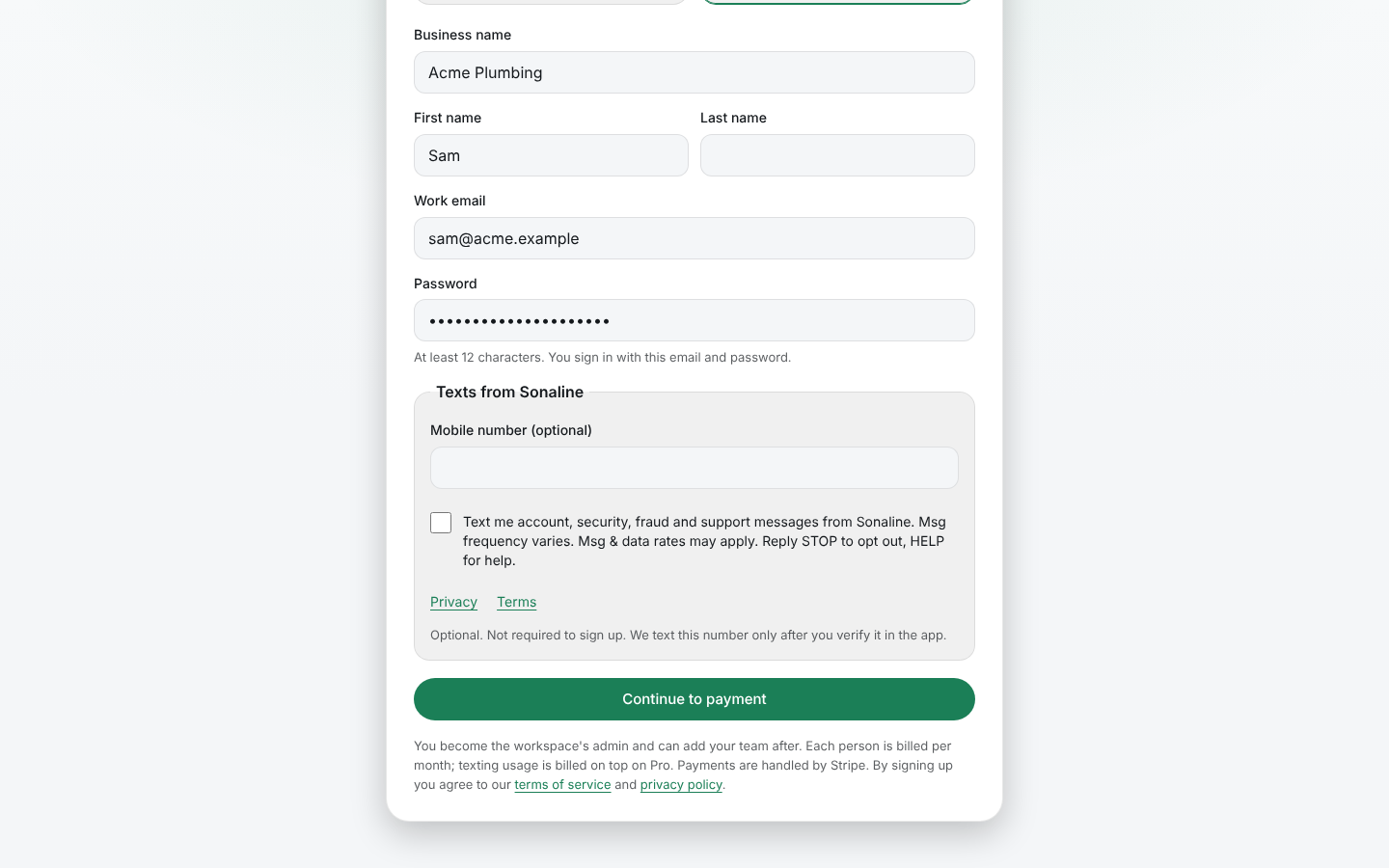
This applies once online sign-up opens. A business starts Sonaline on the public sign-up form at https://sonaline.app/signup. After the name, email and password fields, the form has an optional Mobile number (optional) field and a checkbox. The checkbox is unticked when the page opens, is never ticked for the person, and is not required to sign up. Its label reads:
Text me account, security, fraud and support messages from Sonaline. Msg frequency varies. Msg & data rates may apply. Reply STOP to opt out, HELP for help.
Right under it are links to the Privacy policy and the Terms of service, and the line "Optional. Not required to sign up. We text this number only after you verify it in the app."
Agreeing is not a condition of purchase: the sign-up and the payment go through the same whether the box is ticked or not. If the box is left unticked, the number is not sent or stored at all. If it is ticked, we keep the number, the exact words agreed to, when, and the address they were agreed from. Texts start only after the person verifies that same number in the app with a verification code (section 2), and never to a number that replied STOP.
2. Verification codes: Send code
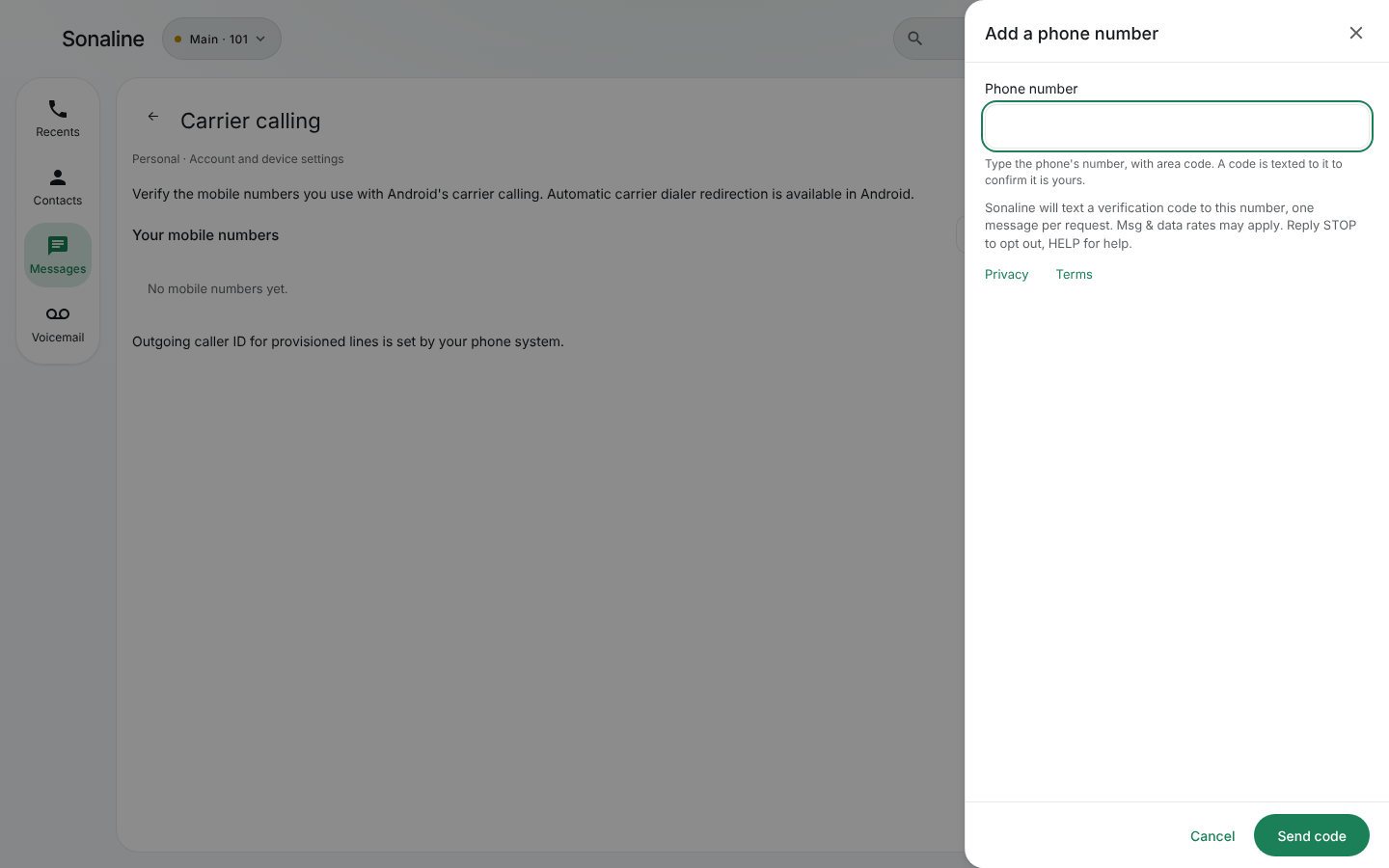
In Settings, Carrier calling, Add a phone number, a person types their mobile number and presses Send code. Above the button they read:
Sonaline will text a verification code to this number, one message per request. Msg & data rates may apply. Reply STOP to opt out, HELP for help.
with links to the Privacy policy and the Terms of service. One code is sent each time they press Send code.
3. Account, security, fraud and support texts: the Texts from Sonaline switch
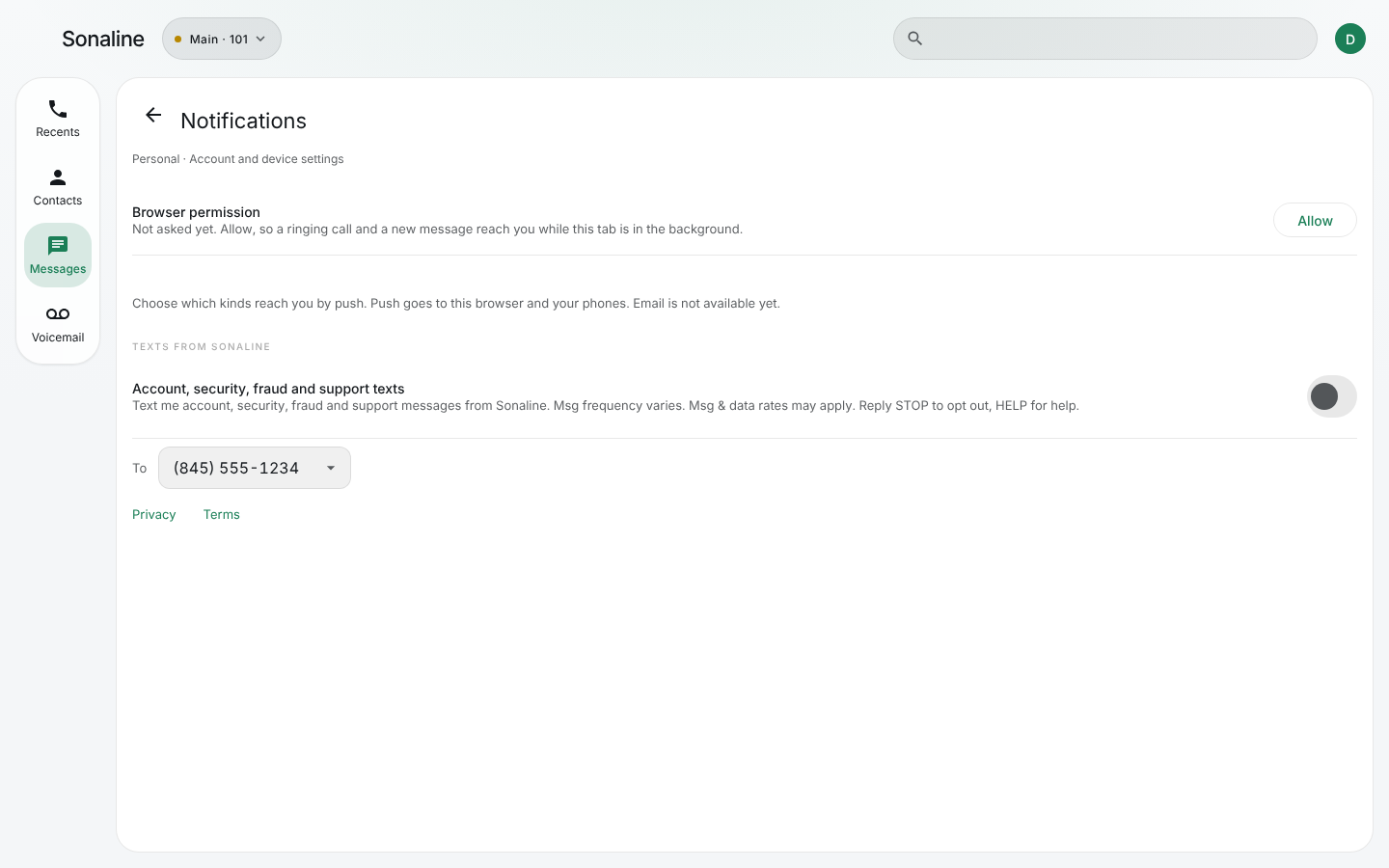
In Settings, Notifications, a person can turn on Texts from Sonaline for a mobile number they have already verified with a code. The switch starts off and is never turned on for them. Beside it they read:
Text me account, security, fraud and support messages from Sonaline. Msg frequency varies. Msg & data rates may apply. Reply STOP to opt out, HELP for help.
with the same Privacy and Terms links. A person who ticked the box on the sign-up form finds this switch already on once they verify that number. Turning the switch off, or replying STOP, ends these texts.
The program
- Who texts: Sonaline (YB Tech Solutions Inc), from its own number.
- What: verification codes; the one code and one confirmation text of the form above; and, only with the switch on (or the form above confirmed, or the sign-up box ticked, and that number verified in the app), account notices, security alerts, fraud alerts and replies from Sonaline support. Never marketing.
- How often: one code per request; on the form above, one code and one confirmation text; other messages vary.
- Cost: message and data rates may apply.
- Stop: reply STOP, STOPALL, UNSUBSCRIBE, CANCEL, END or QUIT. Reply START to receive codes again.
- Help: reply HELP, or write to hello@sonaline.com.
- Agreeing to texts is not a condition of any purchase. Mobile opt-in data and consent are never shared with third parties.
- Carriers are not liable for delayed or undelivered messages.
More detail is in the Privacy policy and the Terms of service.
Contact
YB Tech Solutions Inc, 137 Clinton Ln Apt 4, Spring Valley, NY 10977, hello@sonaline.com.